SmartPlant Foundation (SPF) User Training
Gain practical engineering information management skills with SmartPlant Foundation (SPF) User Training covering document management, information search, project navigation, metadata, workflows, revisions, approvals and collaboration. Develop hands-on skills to efficiently access, manage and exchange engineering information while supporting accurate and controlled plant project workflows.
 1K+ Reviews
Instructor-Led Training Parameters
Course Highlights
- Instructor-led Online Training
- Project Based Learning
- Certified & Experienced Trainers
- Course Completion Certificate
- Customized Learning Schedule
- Doubt-Clearing Sessions
SmartPlant Foundation (SPF) User Training Course Overview
SmartPlant Foundation (SPF) User Training by Multisoft Systems helps professionals master engineering information management. Learn to access, organize, and control project data, documents, and relationships within SPF. This training enhances collaboration, data accuracy, and decision-making across complex engineering and EPC projects.
SmartPlant Foundation (SPF) User Training by Multisoft Systems is designed to help engineering and project professionals effectively manage, access, and control enterprise-wide engineering information. SPF acts as a centralized data management platform that connects people, processes, and information across the asset lifecycle, making it a critical tool for EPC companies and asset owners. This training provides a comprehensive understanding of SPF user functionalities, enabling participants to navigate the system confidently and work with integrated engineering data. Learners gain hands-on knowledge of managing documents, relationships, metadata, and object-based information within SmartPlant Foundation. The course explains how SPF links data from multiple engineering tools, ensuring consistency, traceability, and data integrity across disciplines. Participants also learn how to search, retrieve, and report project information efficiently, reducing data duplication and improving collaboration among teams. Emphasis is placed on understanding data relationships, version control, and workflow processes that support engineering change management and project execution.
By the end of the training, users are equipped to use SmartPlant Foundation as a single source of truth for engineering information. This improves productivity, enhances decision-making, and supports compliance with project and organizational data standards. The course is ideal for users seeking practical, role-based SPF knowledge for real-world engineering projects.
Instructor-led Training Live Online Classes
Suitable batches for you
| Oct, 2026 | Weekdays | Mon-Fri | Enquire Now |
| Weekend | Sat-Sun | Enquire Now | |
| Nov, 2026 | Weekdays | Mon-Fri | Enquire Now |
| Weekend | Sat-Sun | Enquire Now |
Share details to upskills your team
Enquire for Self-Paced Learning
Share your details and our training advisor will connect with you regarding self-paced learning options.
SmartPlant Foundation (SPF) User Training Course curriculum
Curriculum Designed by Experts
SmartPlant Foundation (SPF) User Training by Multisoft Systems helps professionals master engineering information management. Learn to access, organize, and control project data, documents, and relationships within SPF. This training enhances collaboration, data accuracy, and decision-making across complex engineering and EPC projects.
SmartPlant Foundation (SPF) User Training by Multisoft Systems is designed to help engineering and project professionals effectively manage, access, and control enterprise-wide engineering information. SPF acts as a centralized data management platform that connects people, processes, and information across the asset lifecycle, making it a critical tool for EPC companies and asset owners. This training provides a comprehensive understanding of SPF user functionalities, enabling participants to navigate the system confidently and work with integrated engineering data. Learners gain hands-on knowledge of managing documents, relationships, metadata, and object-based information within SmartPlant Foundation. The course explains how SPF links data from multiple engineering tools, ensuring consistency, traceability, and data integrity across disciplines. Participants also learn how to search, retrieve, and report project information efficiently, reducing data duplication and improving collaboration among teams. Emphasis is placed on understanding data relationships, version control, and workflow processes that support engineering change management and project execution.
By the end of the training, users are equipped to use SmartPlant Foundation as a single source of truth for engineering information. This improves productivity, enhances decision-making, and supports compliance with project and organizational data standards. The course is ideal for users seeking practical, role-based SPF knowledge for real-world engineering projects.
- Understand the core concepts and architecture of SmartPlant Foundation
- Learn to navigate the SPF user interface and access engineering data efficiently
- Manage and view documents, objects, and metadata within the SPF environment
- Understand data relationships and how information is linked across disciplines
- Perform effective searches and generate reports for project information
- Learn version control, data revision, and change management basics
- Collaborate efficiently by sharing and retrieving controlled project data
- Ensure data consistency, accuracy, and compliance with engineering standards
- Gain practical skills to use SPF as a single source of truth for projects
- Improve productivity and decision-making in EPC and asset lifecycle projects
Course Prerequisite
- Basic understanding of engineering projects and workflows
- Familiarity with engineering documents and drawings
- General computer literacy and ability to work with enterprise applications
Course Target Audience
- Engineering professionals (process, piping, electrical, and instrumentation)
- EPC project team members
- Document control and information management professionals
- Project engineers and project coordinators
- Engineering data and configuration management users
- Asset owners and operators
- Maintenance and operations support teams
- Quality assurance and compliance professionals
- IT and system support staff involved with SPF usage
Course Content
- Overview of Engineering Data Management (EDM)
- Role of SPF in plant lifecycle management
- SPF architecture and key components
- Data-centric vs document-centric approach
- Common use cases in EPC and owner-operator projects
 DOWNLOAD CURRICULUM
- Logging in and user roles overview
- SPF Explorer and workspace layout
- Menus, toolbars, and shortcuts
- Grids, filters, and column customization
- Saving views and user preferences
DOWNLOAD CURRICULUM
- Understanding SPF object types
- Tags, equipment, lines, instruments, and documents
- Object attributes and metadata
- Relationships between objects
- Viewing object hierarchy and dependencies
DOWNLOAD CURRICULUM
- Document creation and registration
- Document classes and numbering rules
- File upload, check-in, and check-out
- Document versions and revisions
- Viewing and comparing document revisions
DOWNLOAD CURRICULUM
- Simple and advanced searches
- Attribute-based and relationship-based searches
- Saved searches and shared queries
- Using filters for faster data retrieval
- Exporting search results
DOWNLOAD CURRICULUM
- Versioning vs revision concepts
- Document and object lifecycle states
- Status transitions and approvals
- Change history and audit trails
- Managing superseded and obsolete data
DOWNLOAD CURRICULUM
- Linking documents to tags and equipment
- Navigating relationships across disciplines
- Impact analysis using relationships
- Viewing parent-child and reference links
- Best practices for maintaining relationships
DOWNLOAD CURRICULUM
- Introduction to SPF workflows
- Review and approval processes
- Task assignments and notifications
- Transmittals and document exchange
- Collaboration between engineering teams
DOWNLOAD CURRICULUM
- Standard SPF reports overview
- Creating basic user-level reports
- Data export to Excel and PDF
- Using reports for audits and reviews
- Interpreting report outputs
DOWNLOAD CURRICULUM
- Understanding user roles and permissions
- Data access rules and ownership
- Secure handling of project information
- Compliance and governance basics
DOWNLOAD CURRICULUM
- Integration overview with SmartPlant tools
- Viewing data from SPPID, SPEL, SPI, and SP3D
- Understanding federated data access
- Read-only vs editable data
DOWNLOAD CURRICULUM

Request for Enquiry
Explore Course Resources
Strengthen your learning with useful resources designed to help you prepare, practice, and evaluate your understanding.
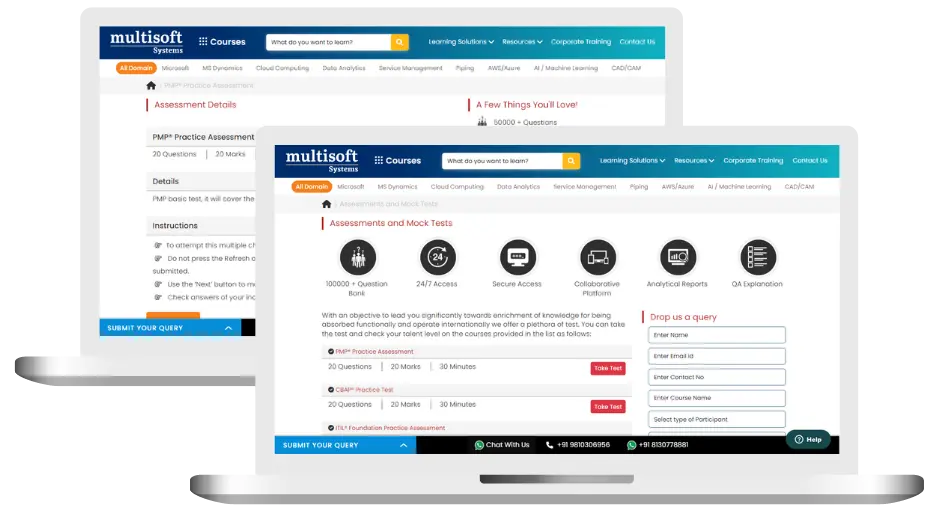
SmartPlant Foundation (SPF) User Training (MCQ) Assessment
This assessment tests understanding of course content through MCQ and short answers, analytical thinking, problem-solving abilities, and effective communication of ideas. Some Multisoft Assessment Features :
- User-friendly interface for easy navigation
- Secure login and authentication measures to protect data
- Automated scoring and grading to save time
- Time limits and countdown timers to manage duration.
SmartPlant Foundation (SPF) User Corporate Training
Employee training and development programs are essential to the success of businesses worldwide. With our best-in-class corporate trainings you can enhance employee productivity and increase efficiency of your organization. Created by global subject matter experts, we offer highest quality content that are tailored to match your company’s learning goals and budget.
Global Clients




Customized Training
Be it schedule, duration or course material, you can entirely customize the trainings depending on the learning requirements
Expert
Mentors
Be it schedule, duration or course material, you can entirely customize the trainings depending on the learning requirements
360º Learning Solution
Be it schedule, duration or course material, you can entirely customize the trainings depending on the learning requirements
Learning Assessment
Be it schedule, duration or course material, you can entirely customize the trainings depending on the learning requirements
Why SmartPlant Foundation (SPF) User Training for Your Professional Growth
Strengthen your professional capabilities with practical learning, industry-relevant knowledge, and skills applicable to real-world business and technology environments.
Industry-Relevant Skills
Gain knowledge aligned with current industry practices, technologies, processes, and professional requirements.
Practical Learning
Understand concepts through practical scenarios, instructor-led discussions, exercises, and use cases.
Enhanced Professional Capability
Strengthen your ability to work confidently with relevant tools, workflows, platforms, and business processes.
Broader Career Opportunities
Add valuable capabilities to your profile and explore opportunities across relevant roles, projects, and industries.
Adapt to Changing Technologies
Stay familiar with evolving technologies, methodologies, and practices shaping modern enterprise environments.
Professional Recognition
Demonstrate your training achievement with a course completion certificate from Multisoft Systems.

 Zoom-in
Certification Training Achievements: Recognizing Professional Expertise
Multisoft Systems is the “one-top learning platform” for everyone. Get trained with certified industry experts and receive a globally-recognized training certificate. Some Multisoft Training Certificate Features :
- Globally recognized certificate
- Course ID & Course Name
- Certificate with Date of Issuance
- Name and Digital Signature of the Awardee
Trending Courses
Why Learners Choose Multisoft Systems
Compare key training features and see how Multisoft Systems focuses on structured learning, practical understanding, and learner support.
Training Features That Matter
Evaluate the learning experience across important areas before selecting a training program.
Instructor-Led Learning
Structured sessions guided by experienced trainers.
Practical Learning
Hands-on exposure that supports concept understanding.
Flexible Learning Options
Learning formats designed around different schedules.
Learner Support
Assistance throughout the training journey.
Learning Resources
Resources that support revision and continued learning.
Training Certificate
Recognition after successful course completion.
Choose Training That Goes Beyond Theory
Multisoft Systems combines guided learning, practical exposure, flexible delivery, learner support, and structured resources to create a more complete training experience.

What Is SAP Convergent Invoicing? Features, Processes, and Business Applications
Managing invoices accurately becomes challenging when businesses handle subscriptions, usage-based... Read Article
SAP SuccessFactors Recruiting: Features, Processes, and Career Opportunities
Recruiting the right talent is essential for business growth, but... Read Article
ServiceNow ITOM Training: Skills, Benefits, and Career Opportunities
Modern businesses rely on IT infrastructure to support applications, digital... Read Article
SAP Hybris Training Functional & Developer: Skills, Modules, and Career Opportunities
SAP Hybris is associated with digital commerce solutions that help... Read ArticleSmartPlant Foundation (SPF) User Training Trainer Profile
19+ Years Experienced
Our SmartPlant Foundation (SPF) User Training Corporate & Certification Program trainers bring 13+ years of proven industry expertise, delivering practical insights aligned with real project environments.
Trained 3950+ Professionals
Our expert trainers have successfully trained 3350+ professionals through structured, real-time training programs designed for industry readiness and career growth.
Certified Experts & Real-Time Project Learning
Build strong practical skills through live project-based training sessions led by certified industry experts with real-world experience.
Hands-on Learning Approach
Gain practical exposure through real-time scenarios, industry case studies, and hands-on assignments that simulate actual project challenges.
Certification Training Guidance
Receive expert support to prepare effectively, practice strategically, and confidently achieve globally recognized certification success.
Customized Training Delivery
Flexible training approach tailored to individual learning goals, skill levels, and evolving industry requirements for maximum effectiveness.
SmartPlant Foundation (SPF) User Training FAQ's
SmartPlant Foundation is an enterprise engineering information management system used to store, manage, and integrate engineering data, documents, and relationships across EPC and asset lifecycle projects.
What Attendees are Saying
Our clients love working with us! They appreciate our expertise, excellent communication, and exceptional results. Trustworthy partners for business success.
Share Feedback



